
TL;DR | The Highlights
- Creating a ramp schedule is faster and more consistent through a guided setup, so you spend less time building segments by hand.
- Products land in the ramp period you intend, so the schedule matches the signed deal on the first pass.
- The ongoing upkeep of ramped segments takes less manual maintenance, which means fewer missed renewal dates and quicker answers for buyers.
When ramp deals first arrived in Agentforce Revenue Management (ARM; formerly known as Revenue Cloud Advanced), they were a meaningful upgrade for any quoting or renewal process because ramping was built into the system rather than bolted on. Salesforce has kept building on that foundation release after release. The Spring updates made ramp deals easier to work with, and the Summer ’26 release pushed them further.
This pattern is worth paying attention to. The more ARM and ARB (or SKUs previously known as RCA and RCB) we implement for clients, the more the impact of these steady improvements compounds, especially for teams migrating off CPQ, where this kind of structure took real effort to maintain. Here is what got better for ramp deals this summer, and what each change means in practice.
So how has ramp management improved? Three changes stand out.
Easier Ramp Schedule Creation
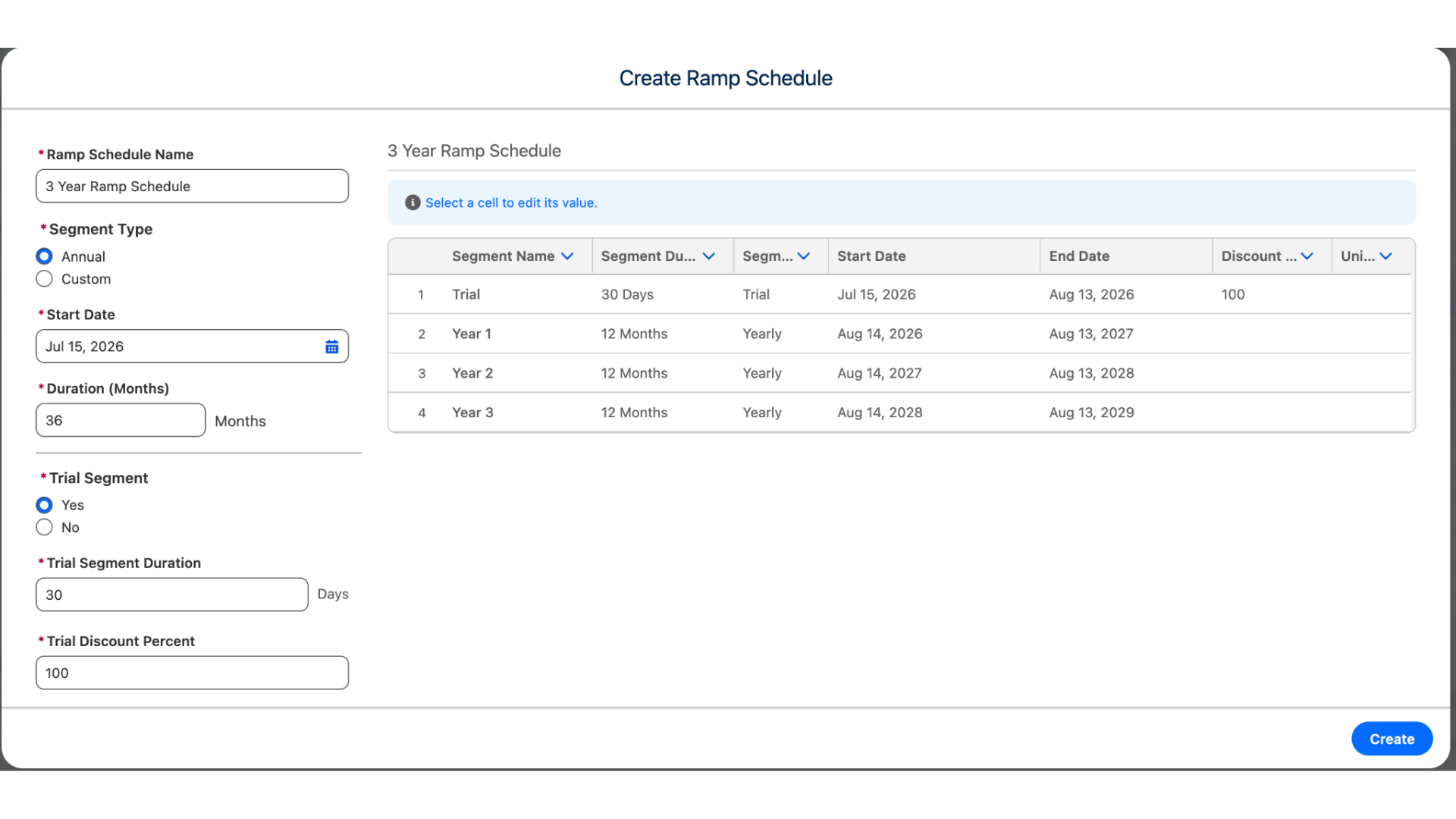
Building a ramp schedule used to mean creating each segment, cloning it for every period, and lining up start and end dates by hand. On a multi-year deal, that was slow and easy to get wrong.
The new release adds a guided ramp setup, sometimes called the ramp wizard, that builds the schedule for you. You define the shape of the deal once, the overall duration, whether the segments follow an annual cadence or custom periods, and whether it opens with a trial, and the system lays out the trial and each year with the dates aligned. Standing up a full multi-year schedule, which used to take a careful, manual build, now happens in one guided flow.
Better Product Placement Within Ramp Periods
A ramp schedule is only right if each product sits in the correct period. Previously, a product added to the deal tended to default to the current period, so an item meant for year two could land in year one without anything looking wrong, until the numbers came back off later.
Now, you can place a product into the period you intend as you add it. The value is straightforward: the schedule matches what was actually sold on the first pass, with less of the after-the-fact cleanup that used to fall to whoever caught the mismatch.
Reduced Manual Maintenance of Segmented Transactions
Ramped deals need upkeep over their life as they get amended and renewed, and keeping those segmented transactions consistent used to take steady manual effort. The Summer ’26 release reduced that maintenance.
For revenue teams, the payoff shows up at renewal. Less manual upkeep means fewer missed renewal dates and quicker, clearer answers when a buyer asks the two questions they always ask: “why am I renewing?”, and “when do I renew by?”. It is a smaller change than the setup improvements, but it is the kind that adds up across a full book of business.
Looking Ahead
None of these changes are dramatic on their own. Together, and release after release, they make ramp deals steadily faster to build and easier to trust. Given what landed a few months ago, we are looking forward to what the winter release and Dreamforce bring for ARM and ARB, because the more of it we implement, the more of the impact we see.
If your team runs multi-year or land-and-expand deals and wants to get the most out of ramp management in ARM, let’s chat.
Let's chat!